Docs
On top of CrossInk
What RetroInk adds
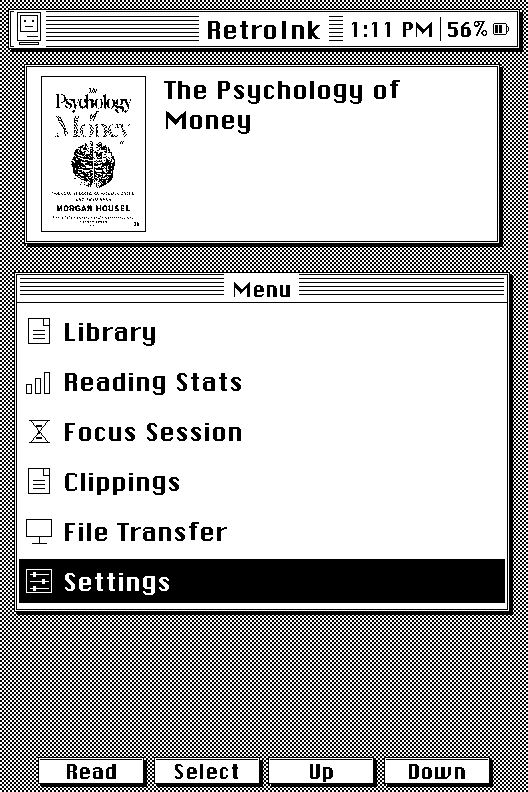
Retro UI
A full System 6 redesign: striped title bars, pixel-drawn Mac chrome,
and a boot sequence with animated eyes, all drawn live with no extra
framebuffers.
Stats Dashboard
Reimagined reading stats: daily goal progress, a 7-day streak strip,
and a full year-long contribution-style calendar grid.
Real Library
Browse your books on real shelves: Left/Right pages through the
current shelf, Up/Down switches shelves instantly, plus custom
shelves of your own alongside To Read, Reading, Finished, and
Favorites, four sort modes, A-Z jump, and an SD-backed catalog built
for thousands of books.
Focus Session
Configurable reading sessions from 5 minutes to 24 hours, daily
goals with an in-book countdown, and Wi-Fi off while you read.
Desk Accessories
A moon drawn from a real lunar photo, a day/night Earth, a ticking
desk clock, the fifteen-tile puzzle, a tilt maze, a calendar, and
system info.
Obsidian Sync
Push saved highlights straight into your Obsidian vault, over your
local network or a webhook, on top of the existing clippings export.
Calendar Sync
Your Google, Apple or Outlook calendar in the Desk Calendar, a full-day
view, and two sleep screens, saved on the SD card.
Hardware
X3, X4 and X4 Pro
The X3 has a battery-backed clock chip; the original X4 doesn't, so it never knows the date or time. On the X4, Moon Phase, Earth, and Desk Calendar ask you to pick a date (and Earth a time and time zone), and their sleep screens show it. The Clock accessory, the reading-stats sleep screens, and daily reading goals are left out, and a few things work slightly differently. Reading, the Library, Focus Session, and stats totals work the same on both. The X4 Pro is supported with its own firmware, a touch-first layout and a brightness panel; the X4 Classic isn't supported yet.
Compare X3, X4 and X4 ProStart here